Help Center
| | Itrademarket Products & Services |
How Inquiry Basket works?
Inquiry Basket works like a shopping cart.
You can add up to 20 numbers of trade offers or company profiles to your list and continue searching.
Then, you can send all your inquiries at one time.
Any sent inquiries will be automatically removed and save to your Trade Mail,
so you can easily manage the inquiry & its responds from your Member Menu.
↑ Back to top ↑ More Inquiry Basket options
Link to Company. Takes you to the company's home page for information about the company, his products and trade offers
Link to Product and Trade Offer Profile. Links to the product and trade offer profile for specifications about the product
Send Inquiry. Sends the inquiry to your selected companies or trade offers
Select All. Checks all the items in your Inquiry Basket
Clear All. Un-checks all the items in your Inquiry Basket
Remove Selected. Deletes the items you have selected from your Inquiry Basket
Link to Trade Mail. You can view any sent inquiries
↑ Back to top ↑ Placing trade offers and companies in your Inquiry Basket
Simply check items of interest and then click on "Add to Basket".
You can view the contents of your list at any time, delete items, and send inquiries. List of sent inquiries can view at Trade Mail.
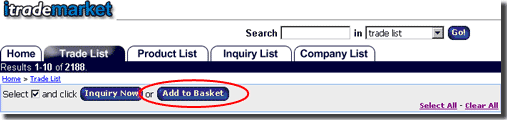
Add items directly from:
Any trade offer search results
Any company search results
Any Company Web Site
Any trade offer page
You may view the contents of your Inquiry Basket from anywhere by clicking on the "Inquiry Basket" link on the top navigation.
↑ Back to top ↑ How to send customized messages to one or more trade offers or companies?
To send customized messages to one or more trade offers or companies, select trade offers or companies using
Select All and Clear All links then click on Inquire Now.
On the next page, you can write a customized inquiry to the selected trade offers and companies.
↑ Back to top ↑ Does Inquiry Basket use cookies?
The Inquiry Basket uses cookies in order to recognize you, retain the contents of your basket, and allow you to view the contents of your basket from different areas of Itrademarket.
If you do not see the "Add to Basket" button or Inquiry Basket link when you are in Trade Offer Search, Company Search or any company & product website, your cookies have been turned off.
You have to configure your browser settings to accept a cookie to use Inquiry Basket.
No other website can read this cookie.
We would like to emphasize that Itrademarket respects your privacy.
You can read more about our privacy policy.
↑ Back to top ↑ Configuring your browser to accept cookies
Check out these details about how to turn your cookies on.
↑ Back to top ↑ |
|

 - Indonesia - Indonesia - United States - Malaysia - India - Pakistan - United Kingdom - Hong Kong - Viet Nam - Thailand - Turkey - Singapore - China
